For small businesses, standing out in the crowded digital space is challenging. While high-quality content and strategic keywords are essential, technical SEO is the backbone that ensures your website gets found, crawled, and ranked by search engines. Even the best content may never reach its target audience without a solid technical foundation.
This guide simplifies technical SEO, breaking it down into actionable steps so that small businesses can optimize their websites effectively.
What is Technical SEO?
Technical SEO refers to optimizing your website’s infrastructure to help search engines crawl, index, and render your pages efficiently. Unlike on-page SEO (content optimization) or off-page SEO (backlinks), technical SEO focuses on improving site performance, structure, and security.
Why is Technical SEO Important for Small Businesses?
- Improves Website Speed & Performance – Faster sites rank higher and reduce bounce rates.
- Enhances User Experience (UX) – A well-structured site keeps visitors engaged.
- Boosts Crawlability & Indexability – Helps search engines find and rank your pages.
- Strengthens Search Rankings – Technical optimizations directly impact SEO performance.
- Gives a Competitive Edge in Local SEO – Small businesses can outrank competitors with better technical setups.
Key Technical SEO Factors for Small Businesses
1. Website Speed Optimization
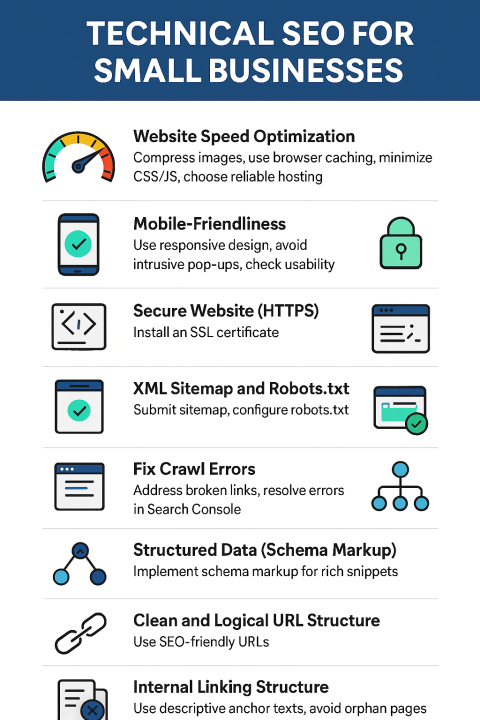
Google prioritizes fast-loading websites. Slow sites lead to higher bounce rates and lower rankings.
Action Steps:
✔ Compress images (Use TinyPNG, ShortPixel)
✔ Enable browser caching (Reduces load time for returning visitors)
✔ Minify CSS, JavaScript, and HTML (Use tools like WP Rocket)
✔ Choose a fast hosting provider (Avoid shared hosting if possible)
Tools:
- Google PageSpeed Insights
- GTmetrix
- WebPageTest
2. Mobile-Friendliness
With 60 %+ searches coming from mobile, Google uses mobile-first indexing.
Checklist:
✔ Use a responsive design (No separate mobile site needed)
✔ Avoid intrusive pop-ups
✔ Test on multiple devices (Google’s Mobile-Friendly Test)
3. Secure Website (HTTPS/SSL)
Google favors HTTPS websites for security.
How to Implement:
✔ Get a free SSL certificate (Let’s Encrypt, Cloudflare)
✔ Ensure all internal links use HTTPS
✔ Fix mixed content warnings (Some elements loading over HTTP)
4. XML Sitemap & Robots.txt
- XML Sitemap: Helps search engines discover your pages.
- Robots.txt: Controls which pages search engines should crawl.
Best Practices:
✔ Submit sitemap via Google Search Console
✔ Block duplicate or irrelevant pages in robots.txt
5. Fix Crawl Errors
Broken links (404 errors) hurt SEO.
How to Fix:
✔ Use Google Search Console to identify crawl errors
✔ Redirect broken links (301 redirects)
✔ Fix server errors (500, 503)
6. Canonical Tags
Prevents duplicate content issues by specifying the preferred version of a page.
Example:
html
Copy
Download
Run
<link rel="canonical" href="https://example.com/main-page" />
7. Structured Data (Schema Markup)
Helps search engines understand your content better, leading to rich snippets.
Types of Schema for Small Businesses:
- LocalBusiness (Name, address, phone)
- Product & Review Schema (Boosts CTR)
- FAQ Schema (Great for voice search)
Tool: Google’s Structured Data Markup Helper
8. SEO-Friendly URLs
Keep URLs short, descriptive, and keyword-rich.
❌ Bad URL: meetthyneed.com/page?id=123
✅ Good URL: meetthyneed.com/on-page-seo-for-small-businesses
9. Internal Linking Strategy
A strong internal linking structure:
✔ Improves crawlability
✔ Distributes link equity
✔ Reduces orphan pages
Best Practices:
- Use descriptive anchor text (Avoid “click here”)
- Link to high-priority pages
10. Duplicate Content Management
Duplicate content confuses search engines.
How to Fix:
✔ Use canonical tags
✔ Implement 301 redirects
✔ Avoid publishing identical content on multiple URLs
Technical SEO Audit Checklist for Small Businesses
✅ Speed: Website loads in under 3 seconds
✅ Mobile-Friendly: Passes Google’s Mobile Test
✅ HTTPS: SSL certificate installed
✅ Sitemap: XML sitemap submitted to Google
✅ Crawl Errors: None in Google Search Console
✅ Canonical Tags: Implemented correctly
✅ Schema Markup: Added for key pages
✅ Clean URLs: SEO-friendly structure
✅ Internal Links: Logical and well-distributed
✅ No Duplicate Content
Final Thoughts
Technical SEO isn’t just for large enterprises. Small businesses also need it to compete. It forms the foundation for all your other SEO efforts and ensures that your content gets seen and ranked. Start with the basics, use the tools mentioned, and prioritize consistent site health monitoring.
If you’re a small business owner or a content marketer, consider performing regular audits and optimizing gradually. Small improvements can lead to big results in search visibility and website traffic.
- Run a free audit using Google Search Console & PageSpeed Insights.
- Prioritize one fix at a time (Start with speed & mobile).
- Monitor improvements and adjust strategies.
Small businesses can level the playing field and achieve long-term organic growth by implementing these technical SEO best practices.